A Long Flight Map Guide
There is no reliable coordinate list or complete interactive map documented for A Long Flight. The practical map is the desert itself: follow Desert Roads or the Railroad, use runways and buildings to confirm your position, and check the Cockpit Radar while searching for the next landing or resupply point. This approach is safer than flying toward an assumed coordinate, especially because the map's exact connections and landmark locations are not fully recorded. When the destination is a fuel stop, pair this route planning with the fuel guide.
How to Navigate the Desert Map
Use a landmark chain instead of trying to cross the desert with no reference point:
- Start from the Starting Hangar or a known airport and choose a visible line such as a road or railroad.
- Keep that line in view while gaining altitude. It gives you a direction to recover if a building or runway disappears behind you.
- Search around the line with the Cockpit Radar when you are looking for a stop. The radar is documented as a navigation aid, but its range and exact marker rules are not documented.
- Confirm the destination visually before descending. A runway, dirt strip, gas station, motel, or other building is a better landing decision than a radar signal alone.
- Note the route mentally after landing. Fixed coordinates, landmark spacing, and guaranteed connections are not established by the available evidence, so do not treat one trip as a universal route chart.
Use radar and airports to navigate the map
These moments support the map guide's advice to search around roads with the radar and treat airports as visual landing references rather than guaranteed services.

The map's useful structure is therefore desert + linear guides + landing areas + scattered buildings. It supports navigation, but it is not a confirmed grid of named zones.
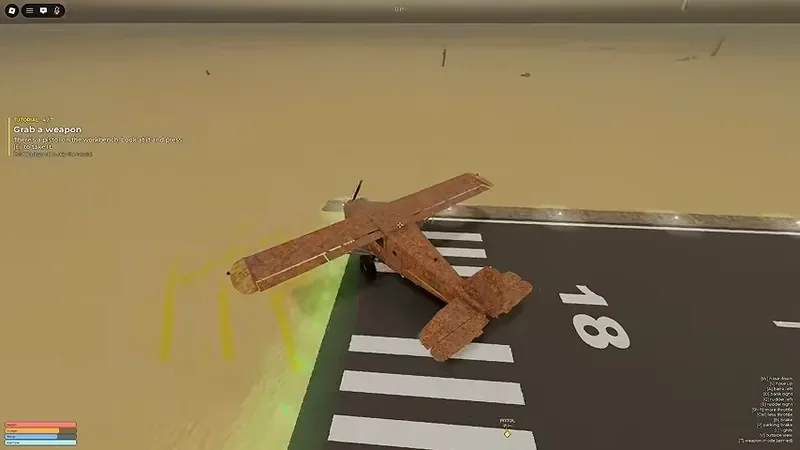
An airport runway helps confirm your position and provides a takeoff or landing reference.
Map Landmarks and What They Are For
| Landmark | Best use | What is confirmed |
|---|---|---|
| Starting Hangar | Begin a flight and check the aircraft | Listed as a main location with the starting aircraft area |
| Airport | Use as a recognizable runway and landing target | Airports are observed on the map, but services vary or are not documented |
| Dirt Strip | Make a planned landing away from a full airport | Players can spot Dirt Strips from the air; exact locations are not recorded |
| Desert Road | Hold a direction and find nearby places | Roads are repeatedly used as visible navigation lines |
| Railroad | Follow another long, straight reference line | The location guide lists a railroad, but its route and interaction are unverified |
| Gas Station | Plan a possible fuel stop and visual checkpoint | Gas Stations are seen in the desert; universal refueling interaction is unconfirmed |
| Motel | Identify a built-up area from the air | A Motel is confirmed as an observed landmark; interior functions are unknown |
| Ranch | Use a building cluster as a location reference | A Ranch is confirmed as an observed landmark; its gameplay interaction is unknown |
| Abandoned House | Search an isolated building after landing | Listed as a location type; loot and refresh rules are not documented |
| Crashed Plane | Investigate a wreck or event location | Listed as a location type; obtainable items are not confirmed |
| Mountain | Avoid as a collision hazard | A mountain collision is observed to cause immediate death |
This table separates navigation value from assumed rewards. A landmark can help you orient the plane even when its loot, fuel, repair, or respawn behavior is unknown.
Choosing a Route and Landing Point
Choose your route based on what you need next, not just on the most distant visible landmark.
When you need fuel
Use a Gas Station as a search target while keeping a second landing option in mind. Gas Stations are useful because they are recognizable from the air and may be associated with fuel, but the evidence does not prove that every station has a working pump, a fixed refill radius, or identical interaction steps. Begin looking early rather than waiting until the aircraft is nearly empty.
If a station is not safe to approach, divert to an Airport, Dirt Strip, or another broad flat area. Fuel planning is also covered by the tank display and the current interaction prompt; the map alone cannot guarantee that a landmark will restore fuel.
When you need a safe landing
Prefer a visible runway or open strip over a cramped building area. An Airport may provide a large hangar or a clear runway, but an observed airport was also described as having little or nothing in it. Treat it as a landing reference first, and verify any fuel, repair, or aircraft-replacement function after you arrive.
Use a Dirt Strip when it is clearly aligned and you can approach with enough room to correct your heading. Do not descend directly toward an unconfirmed landmark if you cannot see a flat landing surface.
When you need to explore
The Motel, Ranch, Abandoned House, and Crashed Plane are reasonable exploration targets. Land nearby only after checking the approach and the surrounding terrain. Their exact rewards and interaction rules are not documented, so visit them as opportunities rather than guaranteed loot routes.
Mountains, Weather, and Visibility Risks
Mountains are the clearest map hazard. One observed flight hit a mountain and ended immediately, so a landmark route is not safe if it forces you through rising terrain. Keep a turn-out path when flying low and avoid committing to a narrow gap that you cannot see through.
Avoid mountains while flying across the map
This moment supports the warning that flying straight into a mountain can end the flight immediately.

Weather makes landmark navigation harder. Lightning, darkness, and tornado conditions can reduce visibility or increase the chance of a collision or emergency landing. In those conditions:
- Slow down before turning near terrain.
- Keep the road, railroad, or runway in sight when possible.
- Leave extra distance from mountains and unknown structures.
- Choose a broad landing area before visibility becomes critical.
- Do not interpret a radar signal as proof that the approach is clear.
If you lose the landmark, stabilize first and then reacquire a road, railroad, runway, or other line. A controlled diversion is safer than descending while guessing where the destination is.
A Practical Map Route Checklist
Before takeoff, decide which of these answers apply:
- Starting point: Do you know whether you are leaving the Starting Hangar or an Airport?
- Reference line: Which Desert Road, Railroad, runway, or terrain edge will keep you oriented?
- Next stop: Is the target a Gas Station, Airport, Dirt Strip, or exploration landmark?
- Fallback: Where can you land if the target is empty, unsafe, or not interactive?
- Terrain: Can you turn away from mountains without losing control?
- Fuel: Will the aircraft still have enough fuel to search and divert?
The strongest map plan is not a fixed list of coordinates. It is a primary landmark, a visible route line, and a fallback landing area chosen before the flight becomes urgent.
Map Questions
Do landmarks have fixed coordinates?
The supplied sources do not provide dependable coordinates, spacing, or a complete connection graph for the named locations. Use the current session's visual landmarks and radar rather than publishing guessed coordinates.
Does the radar show the whole map?
The Cockpit Radar is described as navigation assistance, including help while searching around roads. Its display range, marker rules, and whether it shows a complete map are not confirmed.
Are Gas Stations guaranteed refueling points?
No. A Gas Station is a useful fuel-planning landmark, but the evidence only confirms that players can see one in the desert. Check the current game interaction instead of assuming every station refills the aircraft.
Is an Airport always stocked?
No. Airports are useful landing and orientation points, but one observed airport had little or nothing in it. Do not fly there expecting guaranteed fuel, repairs, or a replacement aircraft.